Supercharge Your Workflow with the Logitech MX Creative Console Graphite

For digital artists, video editors, and content creators, the constant shifting between software menus and complex keyboard shortcuts can be a major creativity killer. Spending hours hunting for the right brush size in Photoshop or scrolling through timelines in Premiere Pro often leads to wrist fatigue and a disjointed workflow. In a world where time is literally money, relying on a standard mouse and keyboard alone often feels like trying to paint a masterpiece with a blunt instrument.
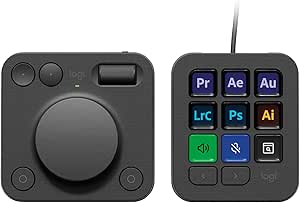
The Logitech MX Creative Console is the ultimate tactile command center designed to bring your most-used tools directly to your fingertips. This sleek Graphite-colored console features a combination of a precise Control Dial and a customizable keypad with 9 vibrant LCD keys. It bridges the gap between your hardware and your software, allowing for fluid, intuitive adjustments that feel natural and fast, transforming the way you interact with apps like Adobe Creative Cloud, Spotify, and Zoom.
Key Features
- 9 Customizable LCD Keys: Personalize your console with visual icons for your favorite shortcuts, macros, and app launches.
- Precision Control Dial: Experience smooth, analog-style control for zooming, scrolling through timelines, or fine-tuning brush parameters.
- Deep Adobe Integration: Specifically optimized for Photoshop, Premiere Pro, Illustrator, and more, streamlining complex professional tasks.
- Multi-App Support: Beyond design, enjoy dedicated controls for Zoom meetings, Spotify playback, and general system navigation.
- Graphite Aesthetic: A premium, modern finish that perfectly complements the Logitech MX series and any professional desk setup.
- Adobe Membership Included: Comes with a 3-month Adobe Creative Cloud subscription to kickstart your creative projects.
Why It’s Worth Buying
The Logitech MX Creative Console is worth buying because it fundamentally changes your relationship with your creative software. While a keyboard is built for typing, this console is built for “feeling” your work. The tactile dial provides a level of precision that a mouse wheel simply cannot match, especially when color grading or editing audio. Furthermore, the visual feedback from the LCD keys means you spend less time memorizing shortcuts and more time creating. It’s an investment in efficiency that pays for itself by significantly reducing the friction in your daily professional routine.
Pros & Cons
- Pros: Highly intuitive tactile control that significantly speeds up video and photo editing.
- Pros: Beautiful LCD keys provide clear visual cues, making the console very easy to learn.
- Pros: Excellent build quality that matches the high standards of the Logitech MX lineup.
- Cons: Initial software setup and customization can take some time to perfect.
- Cons: Requires a wired connection to ensure zero-latency performance for the LCD keys.
- Cons: Full functionality is best experienced within the Adobe ecosystem, though other app support is growing.
Conclusion
The Logitech MX Creative Console in Graphite is a game-changer for anyone serious about their digital craft. By combining visual shortcuts with precision analog control, it provides a level of mastery over your creative tools that you didn’t know you were missing.
